As you create new content, follow this quick start guide that addresses some of the primary ways you can create accessible content. While this does not address every standard of digital accessibility, it covers important and relatively easy things you can do on your own to create content that meets accessibility requirements. See also this list of currently available Testing Tools & Checkers opens a new website for checking your content.
Note for users of screen readers: Letters in parentheses in the instructions below refer to corresponding areas on example images. If you have any questions about these instructions, contact the Office of Learning Technologies for assistance opens a new website.
Formatting
-
Use headings
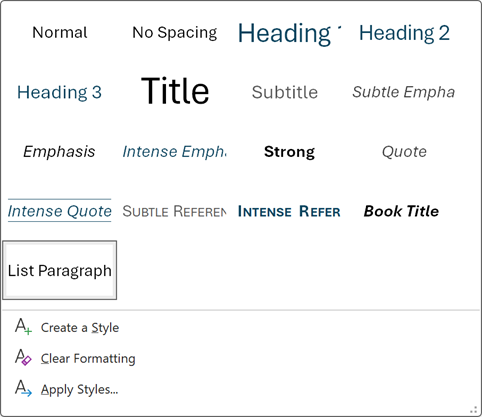
Use headings and subheadings to structure your content on webpages in Canvas and in any documents. So instead of just making text larger and bold to indicate a heading, mark headings and subheadings using the headings (styles) options in whatever tool you are using to build content.
-
Use proper lists
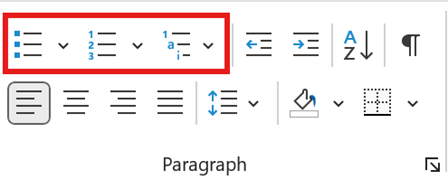
Instead of just dashes or asterisks to mark a list, use the built in list creator in whatever tool you are using (e.g., Canvas, Word, etc.). This allows people using screen readers to navigate lists effectively and provides a consistent visual look.
-
Use consistent menus, buttons and layouts
Content should be easy to navigate so that finding things is easy. Module layouts should be consistent, for example, and instructions for activities as clear as possible. Menus and buttons should be easy to find and in a consistent location. Much of this is accomplished by the structure built into Canvas but keep this clarity and consistency in mind as you build content.
-
Use descriptive links
Instead of “click here,” or the full URL of a link, provide a descriptive link such as, “Read more about descriptive links Opens an external link.” so that students using screen readers will know where the link takes them.
Learn how to create links in the Canvas text editor for course files and other course components Opens an external link. or create links in the Canvas text editor to external URLs Opens an external link..
-
Use accessible font styles
Set a minimum 12–14 pt text size and use only sans-serif fonts to help those with visual limitations.
Read more about fonts and accessibility Opens an external link..
Graphics
-
Provide Alt Text for images
Describe what is in an image in the alt text option with up to around 125 characters in length. If the image contains text, include the text word for word in your alt text or provide it in a long description (see below).
If an image does not convey meaningful information, mark it as decorative.
Read more about creating alt text in documents and on the web Opens an external link..
Learn more about alt-text on Canvas pages Opens an external link..
-
Provide a long description for complicated images
If you need more than 125 characters to adequately convey the meaning of an image or to include all the text from an image, use a long description either on the page near the image or link to a page with a long description that includes a link back to the page with the image for easy navigation. If you use a long description, you should also include basic alt text such as, “Diagram of a eukaryotic cell used to illustrate major organelles. See long description below.”
Learn more about long descriptions and complex images Opens an external link.
-
Use sufficient color contrast
Canvas Accessibility Checker Aim for high contrast between text color and background color to help those with visual limitations. Canvas’s built in accessibility checker Opens an external link. will flag issues of poor contrast on web pages and provide a tool for changing the colors to meet the criteria. Likewise, Word’s accessibility checker Opens an external link. will flag and help you fix contrast issues in a document.
The WebAIM: Contrast Checker Opens an external link. allows you to check contrast in any digital document.
-
Do not rely on color for meaning
Do not create content that requires users to perceive color in order to use or understand it since users can have color perception limitations. For instance, avoid things like, “click the red button to continue,” or a chart with colored bars where the only way to differentiate the bars is by seeing the color, or references in text to elements only by their color (e.g., “as you see in the green bar”).
-
Only use tables for data, not for laying out content
Do not use tables as a means of laying out elements on a page because this interferes with the ability of users to navigate content with a screen reader. When you do use a table for data, be sure that you use column and/or row headers and a caption describing the table to help screen readers make sense of the table. Complex tables should be broken into smaller tables.
Read more about creating accessible tables in Word, PDFS, and PowerPoint Opens an external link..
Read more about using the Canvas accessibility checker Opens an external link..
-
Provide text summaries of graphs and charts
For any graph or chart, provide a text summary of the content in addition to the visual presentation. This not only helps those with perceptual difficulties, but it helps all students with the content. For example, after a bar chart, explain what is in the chart and include the data, “This bar chart compares average exam scores among students using three different study methods. Students who relied on reading only scored an average of 72%. Adding practice problems increased the average score to 81%. The highest performance came from students who combined reading, practice problems, and group study, achieving an average of 88%. The overall trend shows that incorporating more active and collaborative study strategies results in higher exam performance.”
Video
-
Ensure videos have correct captions and transcripts
Videos should have captions and transcriptions for those with hearing limitations. These tools are also useful for people of all abilities. Videos in Kaltura are automatically captioned and transcribed. Go to the caption’s editor in Kaltura to correct any mistakes. For videos outside of your control, such as those on YouTube or other sources, ensure that captions are available. If not, you will need to replace the video with an accessible alternative.
-
Create new video that does not need audio descriptions
When visual information in a video is important to understand the content, audio descriptions that describe the visual information should be provided. For now, you do not have access to a method for creating these audio descriptions. More details about this will be coming in spring. To avoid the need for audio descriptions in the first place, any new videos you create should be made with this in mind. Be sure to describe whatever visual information you are displaying. For example, if you are talking about a flow chart, do not just reference it for viewers to perceive from the visual chart. Instead, describe it (i.e., “Here is a flow chart with three steps showing this process. In the first step, we see….”).