ProctorU
What is it?
ProctorU is an online proctoring service available and accessible through Canvas. See comparison of proctoring services available at UAB.
Features
- 24/7 Live Scheduling Platform
- Multi-Factor Identity Verification
- Guided Live Exam Launch Process
- Environment Security Scans
- Live Monitoring and Intervention
- End-to-end Recordings
- Incident Reporting with 24 hours
- Time-stamped Video Events
Proctoring Cost
UAB's Office of Learning Technologies covers live proctoring (ProctorU) fees for “high stakes exams” regardless of course section. For all other assessment proctoring, Learning Technologies recommends utilizing automated proctoring via Respondus Monitor. See comparison of proctoring services available at UAB. Student Premium fees still apply if students schedule/reschedule within 72 hours of test beginning. Learn more about Premium fees on ProctorU's website opens a new website.
How to Access
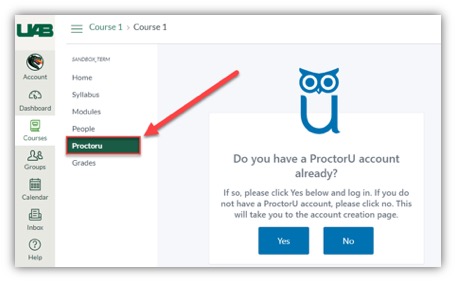
Faculty and students can create their ProctorU account by using their UAB email address to register using the button below. Account creation can also be done by clicking the ProctorU course navigation link from within a Canvas course. The course instructor may need to add ProctorU to their Canvas course's Navigation Menu to access ProctorU inside of Canvas.
Create an account Opens an external link.
Scheduling
Students should schedule their exam proctoring session greater than 72 hours before the exam start in order to prevent on-demand fees.
Note: Chromebooks are not supported for taking a Canvas Quiz proctored by ProctorU.
Instructors
This timeline is highly recommended to ensure a smooth experience for you and your students. We understand that under special circumstances, following this timeline may not be possible. However, the sooner you familiarize yourself with the product, reach out for training, and prepare your students, the better it is for everyone.
Students
Student Getting Started Guide Opens a PDF.
You must download the ProctorU Guardian browser opens a new website in order to take your exams with ProctorU. If you do not have this downloaded prior to your test-taking session, you will be prompted to download it.
During the check-in process, you will also be prompted to download and run LogMeInRescue so that the proctor will be able to enter the exam access code.
FAQ
No, Chromebooks cannot be used to take a ProctorU proctored exam at this time.
Visit ProctorU's' Equipment Requirements opens a new website for the full list of system requirements.
If a photo is taken of the IDs they are purged after 10 days.
Recordings are kept for one year past inactivity and up to seven years. Both screen and video recordings are made available with 24 hours of the session ending. Videos are stores on our U.S. based servers.
Yes.  ProctorU is ADA compliant and will accommodate any students who have an accommodation due to a disability. All you will need to do is ensure the time accommodation is set in Canvas for that student and notify ProctorU. You can notify ProctorU by entering an accommodation request opens a new website.
No, but they may need something else with a reflective surface. If the student is using a computer that has a built-in webcam, they will need to have something with a reflective surface, for example a cell phone (put out of reach before testing begins). This will allow the proctor to view the outer frame of the computer to check for sticky notes or similar items.
Navigate to the link below to copy and paste the most up-to-date information that can be pasted into your syllabus or Canvas Module/page.
Guides & Tutorials
- Adding a New Exam opens a new website Instructors
- Exam Options (Edit, Single-User, and Cloning) opens a new website Instructors
- Getting Started Guide (pdf) opens a new website Students
- Acceptable Identification Documents Students
- Live Student Walkthrough opens a new website Students
- Student Bill of Rights opens a new website Students
-
Archived Workshops
- ProctorU Overview opens a new website Instructors
- Proctoring Options opens a new website Instructors