Poll Everywhere
What is it?
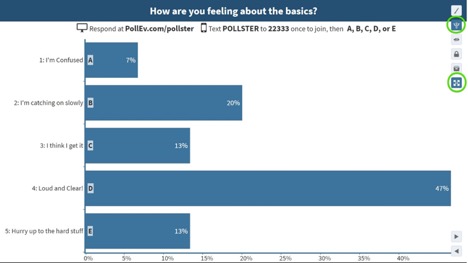
Poll Everywhere is a web-based audience response system that lets you embed interactive activities such as polls, questions, and competitions into presentations. On the surface, Poll Everywhere is a simple application that works well for live audiences using mobile devices like phones. People participate by visiting a fast mobile-friendly web page/app or sending text messages. Instructions are displayed on-screen. The poll that is embedded within the presentation or web page will update in real time.
Compare Poll Everywhere to to iClicker and Zoom Polls
Features
- Gather responses to gauge students’ comprehension before moving on
- Poll students and display class results instantly
- Increase and manage student participation and interaction
- Engage students with competitions (similar to Kahoot)
- Students can respond via computer, tablet, or phone
- Reduce time on administrative tasks such as grading and attendance
- Interactive Q&A feature
- Customize Poll results
How to Access
Download Presentation Apps
Instructors
Faculty sign-in Opens an external link.
UAB faculty have access to Poll Everywhere Pro accounts:
- No limit on the amount of responses per poll
- Access to the reporting feature
- Customize poll URL
- Response segmentation
- Moderation
- Automatic Censoring
- Access to PowerPoint plug-in
Staff/Students
Staff/Student sign-inOpens an external link.
UAB staff and students have access to Poll Everywhere Higher-Ed accounts:
- Limited to 40 responses per poll (polls can be reset for continued use)
- Can present all activity types
- Access to PowerPoint plug-in
FAQ
No, our license includes the cost of students signing up as a participant, and they do not have to pay anything. As far as text message responses, Poll Everywhere does not charge anything to participants. If they send a text response, it will be the same price as if they had texted a regular phone number.
Make sure your Poll has been activated. This can be done from your “My Polls” page or from the activity page. Click the activate icon shown below.

Within a Presentation
To present your activities from within a PowerPoint, Keynote, or Google Slides presentation you will need to have the Poll Everywhere Presentation app opens a new website installed and be logged in to your account to ensure your questions activate.
Polls are automatically activated when you display a slide containing an embedded poll in presentation mode.
Poll Everywhere Troubleshooting Opens an external link.
Poll Everywhere strongly recommends using the latest version of Chrome, Safari, Firefox, Internet Explorer, and/or Edge. Learn more about specific browser versions opens a new website.
There may be a few reasons why an activity doesn’t accept text message responses. Firstly, it is important to remember that only Multiple Choice, Word Clouds, and Open Ended activities can accept text message responses. If you have any other activity type or a survey then text responses will not work.
Guides & Tutorials
- Getting Started Guide opens a new website Instructors
- Connect Poll Everywhere with Canvas opens a new website Instructors
- How to Create a Poll opens a new website Instructors
- Archived Workshop opens a new website Instructors
- Student Guide opens a new website Students
- How to Use Poll Everywhere App Students