Packback
Tool Type
Collaboration & Communication
Who Can Use
Faculty, Students, Staff
Cost & Licensing
Student Paid
What is it?
Packback is an AI-supported online discussion platform that enables curiosity-based student discussion. Learn more about Packback on their overview website opens a new website.
Features
- Algorithmic Moderation
- Instant Quality Rating
- Real Time Coaching
- Post Recommendations
- Custom Feedback
Smart
Feed Sorting- Counter and Supporting Points
- Professor Tools
Pricing
- How pricing on Packback works: The Packback Questions discussion platform is priced on a per-community basis. Communities on Packback are created for each class that is using Packback Questions. This fee is often paid by the student when registering for their discussion community; however, departments and universities may choose to pre-pay for their students.
- The Curiosity Credits Program: Each time a student purchases a Packback community, they earn $3 of Curiosity Credits. The credits are applied toward future community purchases, up to a maximum of $15 off. The students’ Curiosity Credits do not get spent. They are an earned discount that applies at checkout on all of their future communities!
How to Access
Instructors
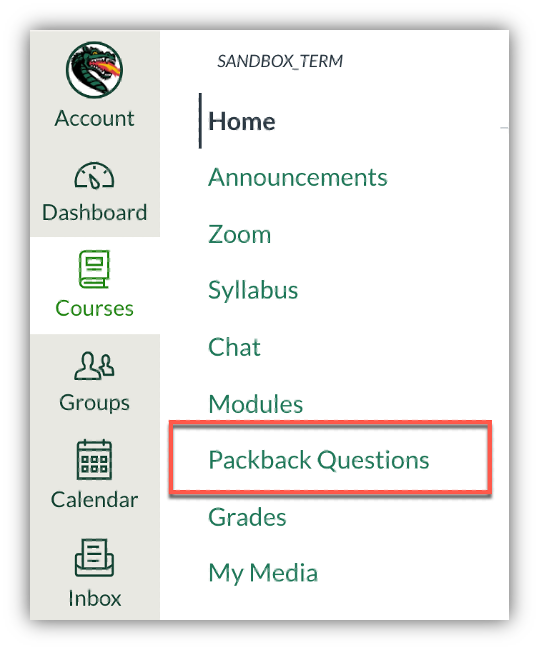
All instructors have access to use Packback inside of the Canvas Learning Management System (LMS). Instructors can add Packback Questions to their Canvas course navigation and access Packback from this link. See how to add items to Canvas course navigation opens a new website. If you have not used Packback before, see the training section below
Training
- Account Executive Julia Downs (
This email address is being protected from spambots. You need JavaScript enabled to view it. ) brings on new professors, helps them create their communities, develops a plan for Packback in their course (grade allocation, weekly expectations). - Experience Manager Bo Massoudi (
This email address is being protected from spambots. You need JavaScript enabled to view it. ) is UAB’s Packback point-person/online TA. Works with professors throughout the term, sets up check-in calls, helps with grading, logistics, professor questions.
Students
Students have access to Packback when an instructors chooses to use it in their course. Access Packback by clicking Packback Questions in your Canvas course navigation.
Guides & Tutorials
Technical Support
Step 1
Status Page
Check to see if there any know issues before submitting a ticket.
Step 3
Contact the Center for Teaching and Learning
If your issue remains unresolved, please submit a CTL support request including any ticket numbers.