All videos uploaded into Kaltura (My Media/Media Gallery) after January 3, 2022 are automatically captioned with english auto-generated captions. If you have media content that was uploaded to Kaltura before this date, you can order auto-generated captions yourself using the instructions below. These instructions can also be used if captions for a source language other than English is needed.
Request Auto-Generated Captions
Users can order automatic auto-generated captioning for a single video or for multiple videos in My Media. These captions are around 90-95% accurate and can be edited by the user after the caption process is complete. Once the request is completed (usually 1-24 hours), the captions will automatically be present on the requested media.
Note for users of screen readers: Letters in parentheses in the instructions below refer to corresponding areas on example images. If you have any questions about these instructions, contact the Office of Learning Technologies for assistance opens a new website.
- Access My Media, click the checkboxes of the desired Media (A). More than one can be selected.
- Click Actions (B), then click + Caption & Enrich (C).

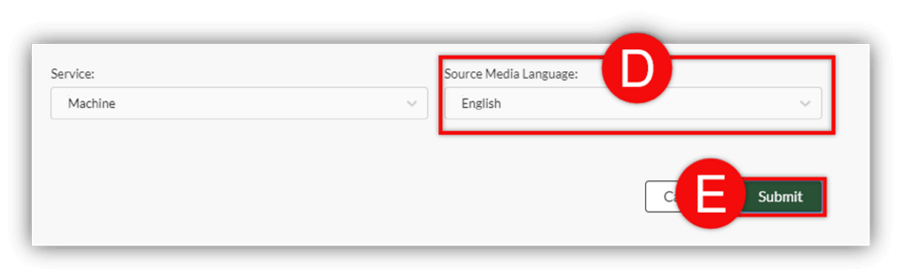
- Click the Source Language (D) dropdown menu and choose the language spoken in the media recording.
- Click Submit (E). The captions will be added to the video(s) automatically (1-24 hours).
Note: We highly advise these captions be edited for accuracy. See the Edit Captions guide to learn how to edit captions once they are completed.